AUTOMATION AND INTEGRATIONS

Workflow
automation.

Less routine. More time for what matters.

Connect repetitive data entry, data synchronisation, approvals and notifications into workflows tailored to your tools and team. From sales and administration to an online shop, we start with the task that takes up the most time.

EXAMPLE WORKFLOW

  1. An enquiry starts a workflow.

    A form collects the details in one place.

  2. Data is synchronised.

    Details are checked and sent to the CRM.

  3. A task is assigned to the right person.

    Set the next step, deadline and any required approval.

  4. The right people are notified.

    The team is notified and the status remains visible in the system.

We adapt the workflow to your rules.
Exceptions stay under control.

Less repetition.
More connected work.

We choose the tasks that take up the most time. We can start with one integration or plan the entire workflow.

01

Sales and CRM

Bring enquiries together and connect them to the next steps in your sales process.

  • Send form enquiries to your CRM
  • Assign contacts and tasks to team members
  • Follow-up reminders and status tracking
EXAMPLE USE CASE

A submitted form creates a CRM contact and a task for the person responsible. A reminder follows if the response is overdue.

02

Tasks and approvals

Organise agreed steps, responsibilities and approvals into a clear workflow.

  • Create and assign tasks when events occur
  • Approve documents, requests and internal proposals
  • Deadlines, reminders and visibility of open tasks
EXAMPLE USE CASE

A new request is assigned to the person responsible. Their approval creates the next task and notifies the team.

03

Documents and data entry

Reduce repetitive data entry across forms, spreadsheets and documents.

  • Capture and validate data from forms or files
  • Generate documents from agreed templates
  • Organise files and link them to the right records
EXAMPLE USE CASE

Form data fills a document template, which is saved to the relevant client record and sent for review.

04

Reports and summaries

Bring data from different sources into the reports your team needs.

  • Agreed daily, weekly or monthly summaries
  • Collect and prepare data from business tools
  • Alerts for exceptions or incomplete processing
EXAMPLE USE CASE

Every Monday, the team receives a summary of sales, open tasks and cases needing attention.

05

Notifications and communication

Send the right information to the right people at the right time.

  • Notify clients when statuses change
  • Internal notifications and reminders
  • Rules for recipients, message content and timing
EXAMPLE USE CASE

A confirmed appointment notifies the client and creates a team task. Changes also update the steps that follow.

06

Data synchronisation

Keep agreed data in sync across your tools without manual exports.

  • Transfer data between CRM, ERP and internal tools
  • Check records, duplicates and inconsistencies
  • Define the source of truth for each type of data
EXAMPLE USE CASE

A client detail changed in the main system is updated in connected tools, while inconsistencies are flagged for review.

07

E-commerce and orders

An online shop is one area where we can connect multiple steps and reduce manual work.

  • Orders, stock, prices and catalogue
  • Connections to accounting tools and delivery services
  • Statuses, returns and customer notifications
EXAMPLE USE CASE

A confirmed order is sent to the business system. Data is prepared for invoicing and shipping, and the customer is notified.

08

Custom integrations

When an existing integration does not fit the way you work, we build a custom connection.

  • Connect systems through APIs and webhooks
  • Scheduled transfers or file exchange
  • Data mapping, retries and exception handling
EXAMPLE USE CASE

An internal tool and an external system exchange data in an agreed format, without manual exports and imports.

Your tools.
Connected work.

We assess integration options based on APIs, available data and how each system works.

Business systems

CRM, ERP, accounting software and internal tools. We start with the systems you already use.

Collaboration and documents

Email, forms, spreadsheets, documents, task tools and team collaboration platforms.

Online shops

WooCommerce, Shopify and custom solutions. Orders, stock and delivery are one of the areas we can automate.

When a direct integration is unavailable, we also assess agreed data file exchanges or a custom integration.

CLEAR RULES AND VISIBILITY

Automated.
And under control.

A good workflow must also account for changes, failed transfers and special cases. We define the rules and responsibilities before implementation.

A clear source of truth
Define which system owns each type of data and how inconsistencies are resolved.
Exception handling
Define what happens when a transfer fails, a message is repeated or a connection is unavailable.
Your team stays in control
Approvals and sensitive decisions stay with the right people.
Visibility into operations
The scope includes agreed alerts, processing history and response instructions.

We start with the process.
Then proceed step by step.

Clear scope, testing and handover. We adapt the pace to the systems and the team using them.

  1. 01

    Review your workflow.

    Get to know your team, tools and the tasks that take up the most time. Choose a suitable first workflow.

  2. 02

    Agree on the rules.

    Check integration options and define data sources, approvals and exception handling.

  3. 03

    Connect and test.

    Build the connection and test normal cases, repeated messages, interruptions and failed transfers.

  4. 04

    Hand over for use.

    Hand over instructions, operational visibility and an agreed support plan. Add further workflows in priority order.

What do we include in the agreed scope?

  • Review of workflows and the biggest time sinks
  • Checking access and integration options
  • Workflow plan and agreement on data sources
  • Implementation of integrations and automation rules
  • Testing normal workflows, exceptions and failures
  • Instructions, handover and a support agreement

Any questions
still open?

Every project starts with questions.
Here are a few answers.

Ask us
01

What can you automate?

Repetitive workflows in sales, administration, reporting, communication or an online shop. We start with a specific task and check which steps and tools can usefully be connected.

02

Do we need new software?

Not necessarily. We first review the tools you already use. The options depend on available APIs, documentation and data exchange methods. We suggest a new solution when existing tools are not sufficient.

03

Can you also automate an online shop?

Yes. E-commerce is one of the areas where we have extensive hands-on experience. We can connect orders, stock, accounting, delivery, returns and notifications. We assess the options for WooCommerce, Shopify or a custom solution based on your existing system.

04

Does everything need to be automated at once?

No. We can start with a single data transfer, approval or report. Once the first workflow has been tested in practice, we agree on the next priority.

05

What happens if an error occurs or a connection goes down?

During planning, we define logging, alerts, retries and the cases that need manual review. This gives your team a clear response procedure.

06

Can a workflow include manual approvals?

Yes. Automation can prepare data, assign a task and wait for the person responsible to approve it. Sensitive decisions and approvals are defined together with your team.

07

How much does it cost and how long does it take?

That depends on the number of systems, data quality, available integrations and workflow rules. After the initial review, we prepare a defined scope, quote and indicative timeline.

08

What should we prepare for the first conversation?

Tell us which tools you use, what you currently enter or check manually, and where errors occur most often. One specific example of a workflow is a useful starting point.

START WITH ONE SPECIFIC EXAMPLE

Where are you
losing time?

Tell us what you re-enter, reconcile or check manually. Together, we will find the right first step.

Let's talk about automation

Where will your idea take you?

15 results to explore

QUICK LOOK / SELECTED PROJECTS
Online shop

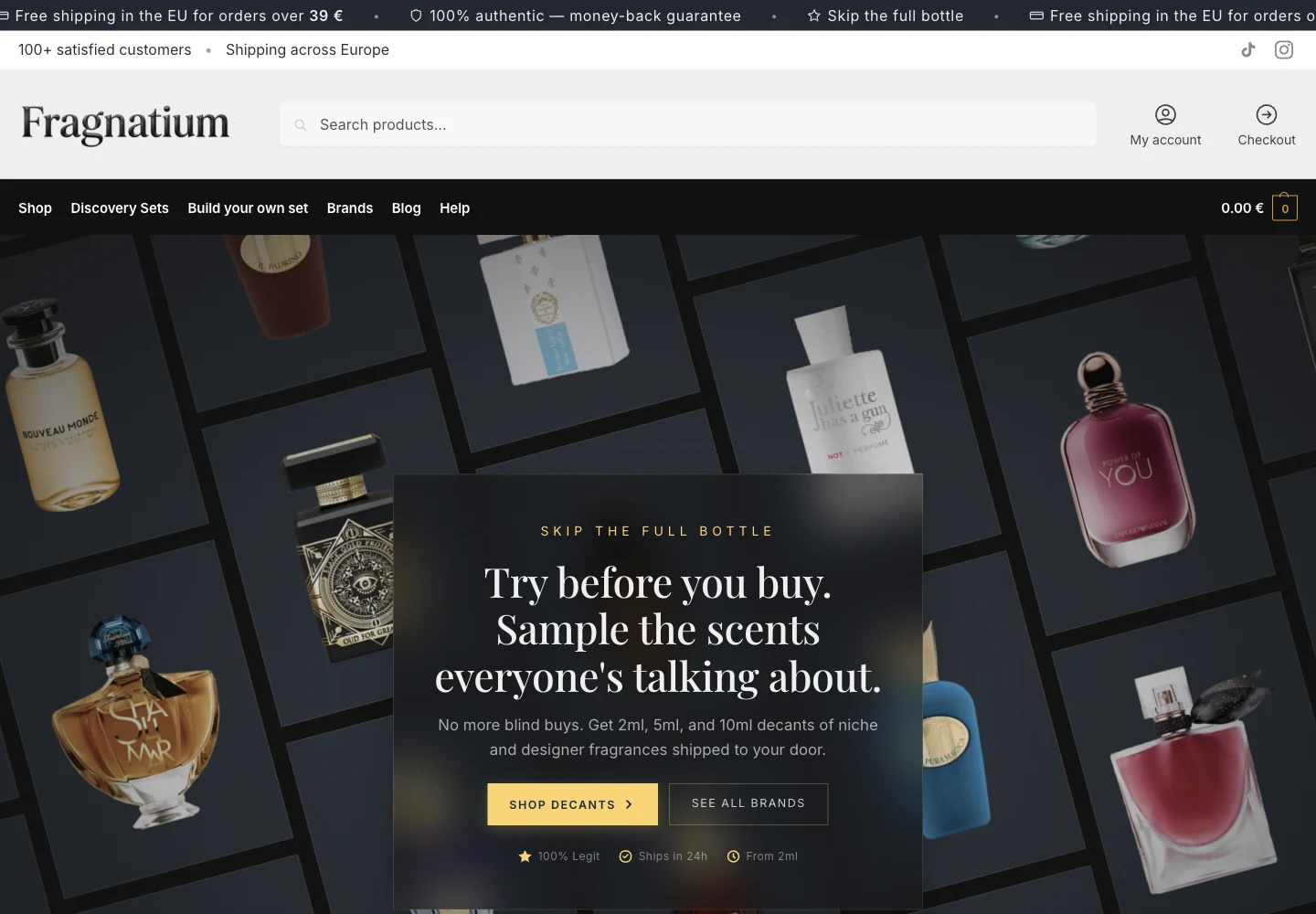
Fragnatium

fragnatium.com
Fragnatium online shop with a selection of fragrances and a dark hero design

Design and developmentA fragrance catalogue, product variations and discovery set builder on WooCommerce.

  • WordPress
  • WooCommerce
  • PHP
  • JavaScript
Technical overview
01 / 09
Project preview